
USER FEATURES
26
INTUITIVE APP FEATURES
User Features
Features
Additional to the treasure trove of great deals and things to do users can find in one place, useful features are logically organised to help them quickly find exactly what they’re looking for.
ALWAYS UP-TO-DATE
Every special and event on RedPaint is either current or upcoming - no outdated or expired information cluttering your feeds.
CALLS & BOOKINGS - In-app convenience!
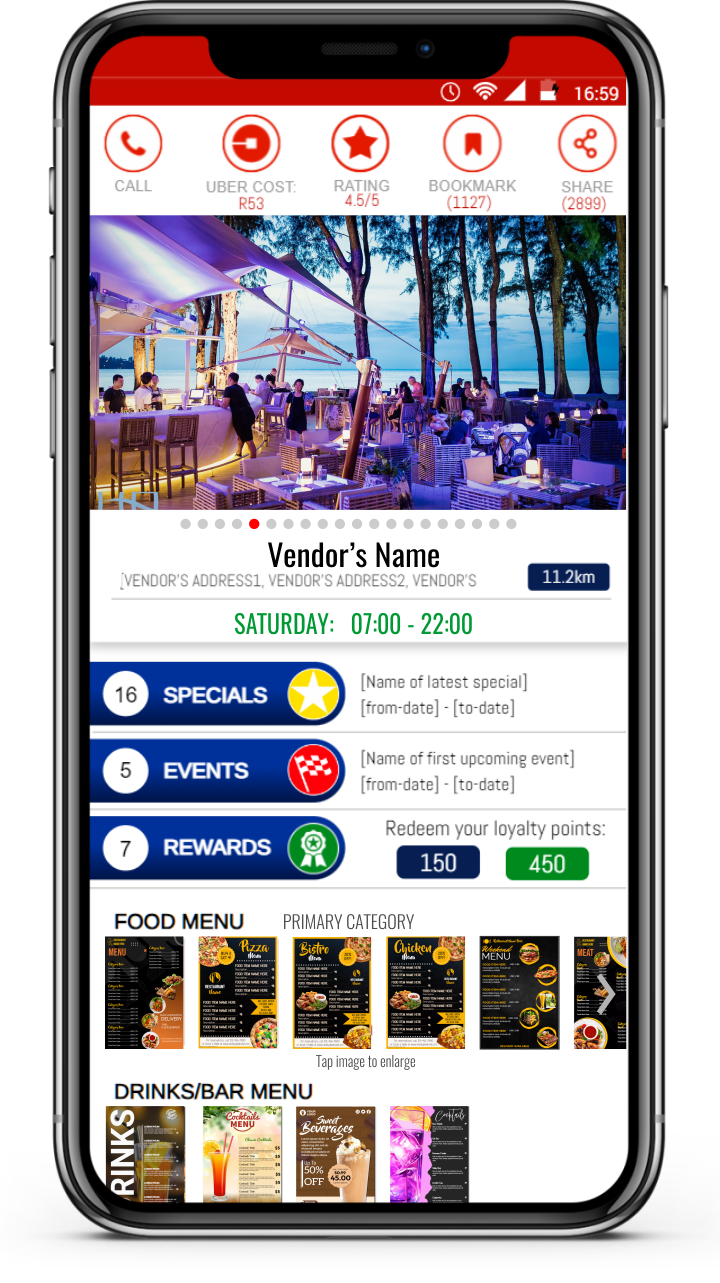
Users can make calls, place bookings and make enquiries from within the app. The convenient auto-fill booking/enquiry form makes it easy for consumers to place a booking. Tapping the "Call" button opens the user's phone and start making a call to the vendor.
MAPS & UBER - Easy Directions!
An integrated Google Maps function assist users with directions to the Vendor's place of business. For Uber rides, the user simply taps the "Copy" button next to the Vendor's address, then tap the "Uber" button and paste the address in the Uber app to order an Uber to the Vendor.
SET REMINDERS - Never miss a deal!
Use the Set Reminders feature to ensure you don’t miss out on a special or event. When the time comes, you’ll get a push notification. You can manage all your reminders in the Reminders section, and once a special or event expires, it’s automatically removed from your list
FAVOURITES
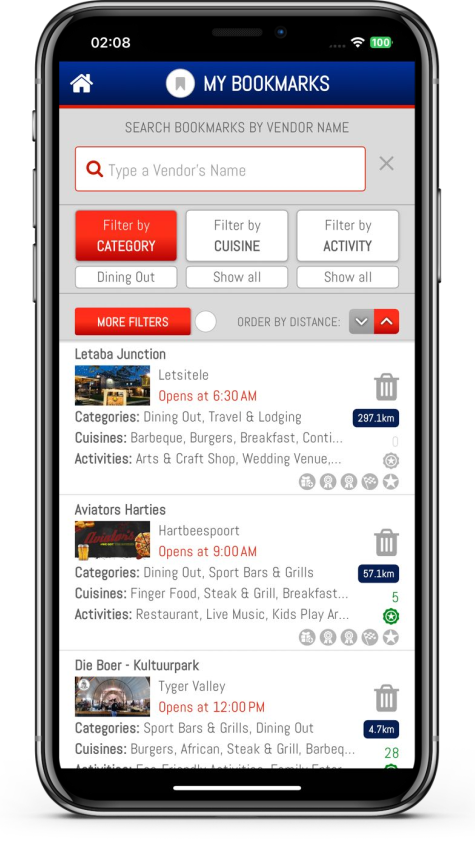
Easily keep track of your go-to vendors by bookmarking them in the app. Visit your Bookmarks section to view and manage your favourites, with handy icons giving you a quick glimpse of their latest offers.
NOTIFICATION HISTORY
It's common to miss or clear push notifications, but RedPaint archives them for up to 45 days in one place where users can easily find them. Expired promotions are automatically removed, while refined filters (like advertiser, distance, cuisine, activity, loyalty points, etc.) make it easy to find what you need.
REWARD PROGRAM
Earn Rewards Points effortlessly on RedPaint! Simply share content from the app with friends on platforms like WhatsApp, Facebook, Telegram, Instagram, TikTok, and more, or invite friends and businesses to join the RedPaint community. Accumulate points that you can redeem for fantastic freebies at participating businesses (T’s & C’s apply).
THREE BROWSING MODES
Users can explore RedPaint in three browsing modes.
Switch between modes by tapping the location/mode icon in the top-right corner of your screen:
- Current Location Mode (CLM):
Current Location Mode is the default mode – it lists businesses in your feed (screen) based on your current location and the within the radius distance you set in your Preferences. - Home Location Mode (HLM):
Wherever you are you can quickly switch to Home Location Mode. This feed lists businesses in close proximity of your home location, based on the distance you have set under your Preferences. - Search Mode:
Utilize the Search function – tap the magnifying glass icon in the top-right corner of your screen - to find vendors, cuisine, or activities in any location, filtered by distance, business category, cuisine, and activities.
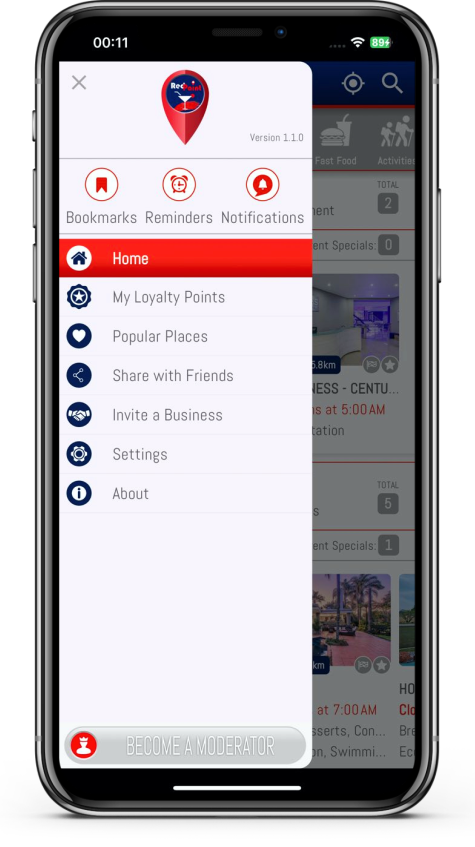
USER MENU
The User Menu provides quick access to:
- Bookmarks
- Notifications
- Reminders
- Loyalty Points
- Settings: Profile, Preferences
- Share with Friends
- Invite a Business
For regular users, the option to upgrade to Moderator status unlocks the opportunity to earn money with RedPaint. The upgrade button is conveniently located at the bottom of the menu.
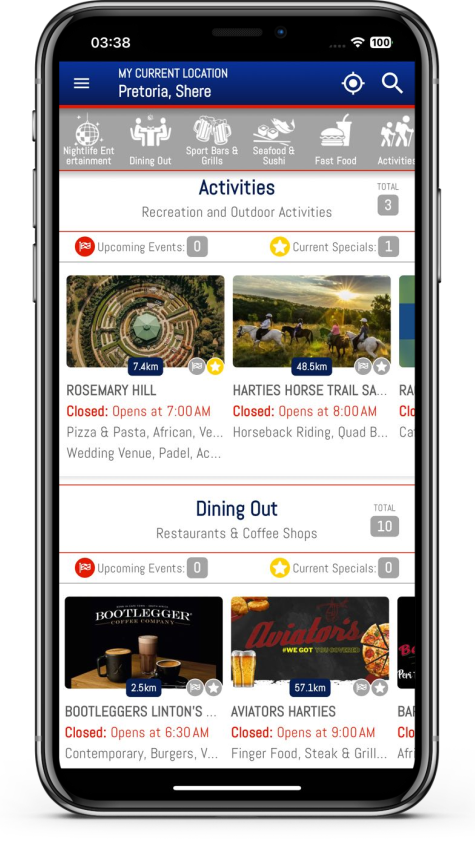
CATEGORIES
RedPaint is transforming your online experience like never before. Stay ahead of the game with push notifications about the latest Special Offers and Events in categories like:
- Nightlife Entertainment
- Dining Out
- Sport Bars & Grills
- Seafood & Sushi
- Fast Foods
- Activities
- Live Events
- Venues & AV Hire
- Travel & Accommodation
- Attractions
- Sports & Fitness
- Beauty & Wellness
- Arts & Theater
- Hunting & Safaris
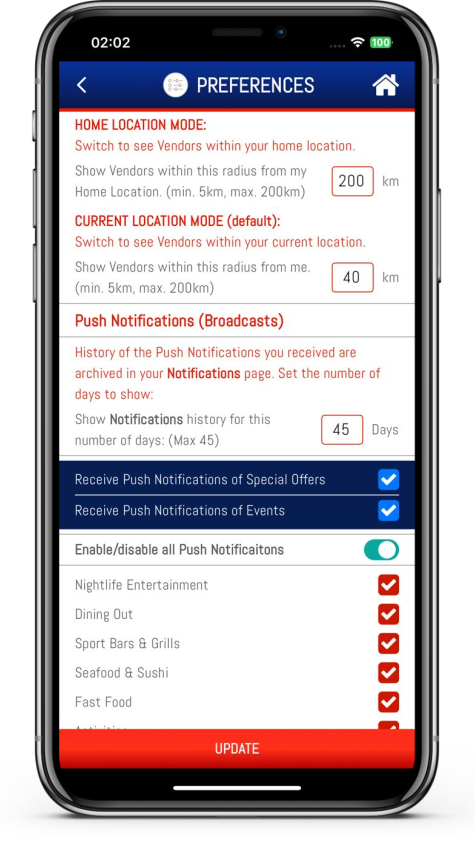
SETTINGS - PREFERENCES
Tailoring your experience with Preferences puts you in control of the information you see in your feeds and the notifications you receive. Customize your preferences by category, distance, events, special offers, and even specific vendors. For example, if you prefer not to receive notifications about nightclubs (category), you can easily block them by checking a box.
EARNING INCOME
Earning income might not be your primary goal with RedPaint, but why not make some extra cash while using our app? Users can upgrade to Moderator status for FREE and start earning income by spending just a few minutes a day reviewing content before it’s published.
ICONS
Icons on the RedPaint app serve as crucial indicators, offering a quick glance into what places (vendors) have to offer. This feature is so important that we've dedicated an entire page to explain the meanings of these icons.
MAP
Locate any place (vendor) effortlessly by using the MAP feature at the bottom of every vendor's profile page. This feature takes you directly to Google Maps on your device, guiding you to your chosen destination with ease.
GET A RIDE
Need a ride? In the Vendor's profile page, simply tap the "copy" icon next to the address, then tap the Uber button at the top to open the Uber app. In the "Where to" field, paste the address and choose your ride.
NAVIGATING THE APP
EXPLORE
BROWSING TOP VENDORS
The Home Screen - also called the Category List View - showcases the first ten Vendors in each of the Main Categories, based on the user's current location. Users can start their journey here and delve deeper to view all vendors in all categories. Tapping a vendor's primary image will take you directly to the vendor's profile page.
EXPLORE A SINGLE CATEGORY
Tapping a category name or the Main Menu, you can navigate to a specific category of interest, allowing you to explore businesses in a specific category. We call this the Single Category View. In this view you can tap a vendor's image to be taken directly to its profile page, or filter to view all vendor's Specials or Events in one place for the selected category.
VIEW VENDOR DETAILS
Each Vendor has a Profile Page where you can find information about the Vendor's business; location, business hours, specials, events, rewards, food menus, pricelists, and Google Map. It's a one-stop destination to explore what each Vendor has on offer. From here you can contact vendors directly and place a booking or make an enquiry.
SEARCH WITH EASE
RedPaint makes it effortless for you to discover Vendors in any location. You can search for Vendors in any location by name, category, cuisine, and activity. We take it a step further by enabling you to filter search results to display Vendors with special offers and upcoming events. This feature is incredibly useful for planning holidays or business trips, ensuring that you can take advantage of current discounts and exciting events in advance.
BOOKMARK FAVOURITES
You have the option to bookmark YOUR favorite Vendors to view their specials, events, and rewards.
SHARE TO EARN LOYALTY POINTS
Share your findings with friends on social media platforms or via email. Sharing not only spreads the word but also earns you Loyalty Points.
VIEW NOTIFICATION HISTORY
Conveniently access all past notifications of specials and events by visiting the “Notifications” screen, dating back as far as 45 days. This feature is useful when notifications were missed. Even here all expired specials and events are removed from the list automatically, ensuring you only see current information.
SET REMINDERS
An amazing feature! Set reminders for specials and events, ensuring that you never miss out on fantastic deals or exciting events. When the scheduled time arrives, you are reminded by a push notification sent to your device.
REWARDS
By sharing content you accumulate Loyalty Points, which can be redeemed for Rewards (free gifts) at Vendors' places of business. View your Loyalty Points with Vendors by visiting “My Loyalty Points” from inside the burger menu. Use the Filters to refine your search by category, cuisine, activity, and type of rewards.
LEVEL UP TO MODERATOR STATUS
You have the opportunity to level up from regular users to Moderator. Moderators perform quick and easy moderation tasks and earn commissions based on Vendor purchases when boosting promotions on the app.
SET YOUR PREFERENCES
Manage your app experience through your Preference Settings:
- Set the distances for how far away vendors from your home- or current location will be listed in your home screen.
- Set the number of days you would like to review past notifications of Vendor campaigns (specials and events).
- For a tailored experience, customise your preferences for the types of Notifications you wish to receive by enabling or disabling categories.
- Exercise the option to block or unblock individual vendors from whom you prefer not to receive notifications.
- Mute or unmute all push notifications from RedPaint as needed.
RedPaint provides you with a user-friendly interface and a plethora of features and options to explore, engage with businesses, earn rewards, and personalize your experience within the app. It's a powerful tool designed to enhance your online experience of how you find and receive offerings from businesses you prefer.
App Permissions
Permissions
When downloading the app you will be prompted to provide RedPaint access to certain features on your device. To enjoy a personalized experience with RedPaint and receive information most relevant to you based on your settings, please be sure to grant the following app permissions when prompted:
LOCATION:
RedPaint requires your permission to access your device’s GPS location (including latitude and longitude) even when the app isn’t actively in use (known as background location access). This feature enables us to send you real-time push notifications about nearby promotions and events, ensuring you receive timely and relevant offers wherever you are.
For instance, if a vendor is hosting a karaoke night starting in an hour and uses RedPaint’s Instant Boost feature to immediately notify users within a specific radius (location), you will receive the push notification. This happens because your device’s location is updated in the background, even when you’re not actively using the app.
The Purpose of Background Location Access:
-
Allows RedPaint to deliver real-time promotions and push notifications initiated by vendors.
-
Ensures you receive timely and relevant offers while you’re on the move and in close proximity to vendor locations.
Privacy Assurance: -
Your background location data is used solely to enhance your app experience.
-
We do not store your location data long-term.
-
Your data is not shared with any third parties.
User Control: -
You are in full control of this feature.
You can disable background location services at any time by adjusting your settings in the Preferences section.
The Purpose of Foreground Location Services
When you use one of our foreground location-enabled services (when actively using the app from a mobile device), we may collect and process information about your mobile device’s GPS location (including the latitude, longitude or altitude of your mobile device) and the time the location information is recorded to customize the Services with location-based information and features. For example - in case of a regular users - to inform you about merchants (Vendors) in your area or applicable promotions, or – in case of a vendor – to determine the number of users in your (Vendor) selected target audience when you run a promotion.
Some of these services require your personal data for the feature to work and we may associate location data with your device ID and other information we hold about you. We keep this data for no longer than is reasonably necessary for providing services to you. If you wish to use the particular feature, you will be asked to consent to your data being used for this purpose.
You can withdraw your consent at any time by disabling the any GPS or other location-tracking functions on your device, in which case most of the app’s core features will not work, rendering it almost redundant. See your device manufacturer’s instructions for further details.
Ensures that users receive personalised and relevant information and promotions based on their location, in line with their preference settings. For vendors, the app needs their location for running targeted campaigns.
PHOTO GALLERY (vendors):
Allows vendors to access their photo galleries for uploading images to RedPaint.
CAMERA:
Allows vendors to take photos with their device's camera to upload to their profile.